


Let's talk about launching products.
Here, there are usually two kind of companies:
- The ones launching new products often, and it's part of their marketing strategy (fashion companies with collections, etc.)
- The ones launching a new product one or two time per year - and it should be a big event, because this could drive new orders, repeat customers, activate them again, etc.
Planning a product launch email (or a whole launch newsletter sequence) is a big job.
Below, we'll give you tips and inspiration, templates, real examples to steal, and the fastest way to find the exact inspiration you need.
What's a product launch email? And a sequence?
You probably received thousands of them already.
A product launch email is a email sent to announce a new product/collection/feature to your audience.
The best onces should do 3 jobs:
- Build anticipation before the the launch
- Make the launch impossible to miss
- Give people a reason to buy now (or, even better, before the launch as a pre-order!)
A launch should never be one email.
It should be a sequence of emails: several emails sent one after another, with teasers, announcements and follow-ups.
This is exactly what we'll review today.
On top of single email breakdowns, we'll review how to build the best email sequence for launch, based on your goal and how this launch is important for your brand.
Plan before writing any email
Let's do some planning first
Not the content itself — just the plan.
You should plan your sequence in advance, and as we've said, it should be more than one email.
One email is not enough to introduce a new product to your audience: you'll need multiple.
You'll need multiple emails, multiple angles, multiple channels, multiple ways to frame your product, and your launch.
So before sending anything, think first. Don't just send an email announcing that you've launched something new.
You can do dozens of things:
- Tease your audience: build up expectations, explain what you're doing, why you're doing it and what you're about to launch, etc.
- Launch it using social proof, customer benefits, comparisons, from an upsell perspective, etc.
- Even after the launch, come back to the new product so your audience is aware and understands it.
There's one key rule: make sure your audience gets what's in it for them.
Also, if you can, don't only use emails: you have SMS, WhatsApp, ads, landing pages, etc.
There's one thing I want to highlight too before we start with the templates.
Email Segmentation.
Split your communication between existing and new clients.
Introducing a new product doesn't mean the same thing to someone already using your solution/your products, vs. someone still about to try you out (or, has barely heard of your brand already).
- For your existing customers, a launch sequence is an upsell opportunity (for active clients) or a reactivation opportunity (for dormant non-active clients).
- For new customers, this is a great way to get them onboard.
These are two very different goals.
Two very different email sequences as well.
The emails you should send in a product launch sequence
Must have: the minimal short sequence
Brands who are launching a lot of products or collections on a yearly basis (5+ launches) always using the very same pattern.
Five or six emails, over a week:
- Coming soon - the teaser. You hint something's coming. No hard sell. A date, a blurred image, a question. The goal here is to create curiosity.
- Tomorrow - another teaser, to build up expectations.
- Just launched - it's launch day, the reveal. Lead with the product. One clear CTA. Show it in use.
- Don't miss out - it's a product deep-dive — the "why it exists" email. Story, problem, who it's for.
- Social Proof - all about early reviews, sold-out stories, UGC.
- Last chance - this is for real urgency only. Launch pricing ending, low stock, bonus expiring.
That's it.
You tease a bit, you launch, you insist on the launch you've just done.
That's the basics of how to launch a new product.
There are variations of course, but this is your basics, and a lot of companies are actually doing it this way.
Go back through their emails from last month, and the month before, and it's the same thing again and again (you can check Skims, Nike, FashionNova, etc.).
These are companies launching new collections or new drops pretty much every two weeks, and they really managed to create a rendezvous with their audience, even by using the very same copywriting, the very same tone of voice every single time.
So if you have plenty of launches happening during a year, if you have multiple launches a month, whether you're in e-commerce or a software company, this might be the way to go.
Just make sure to A/B test heavily your emails at the beginning, find a winning pattern/sequence so you can turn every launch into a rendezvous. This way, your audience knows what it's about and knows that there's something new happening.
Once you find a pattern that works for you, stick to it.
The big event sequence
Now the opposite situation.
If you're not launching a lot of new products (maybe one or two launches per year), then the one thing you need to do is turn that launch into a big event.
I've seen up to 18 emails for a single launch, and I strongly believe that anything between 9 and 12 is very good.
And the cool thing is, six of them don't even mention what the launch is about. They're just building up the interest of the audience.
Here's how it could run:
- 1. A surprise is coming. Not a word about the product.
- 2. Something powerful is coming. Continue to tease and build up engagement with the audience.
- 3. Tomorrow's the big day. Advertise the date, so people will expect something.
- 4. We're live now. Let the audience discover for themselves what is the launch about, it's the reveal (and it doesn't have to be the launch itself, just the reveal!)
- 5. Missed our product launch? Introduce a wait list, so you can collect everyone's interest.
- 6. Here's what this product does. Explain why/how you've built this product.
- 7-89. Still coming soon. Join the wait list, here are the ingredients, some early feedback we received, etc.
- 9. It launches tomorrow.
- 10. Just dropped — with a promo code for the launch.
- 11–12. Repeating the message, over and over, now that the product is launched (and congratulations!).
Five emails of teasing, one recap, and only then: here's what it does.
Emails 7 to 10, the product still isn't available — it's coming soon, join the wait list, pre-order.
Only the last two, you can actually buy it part of the launch sequence (after this, it's the job of regular newsletter campaigns).
A launch is a big thing.
So go big if you believe that it's a good fit.
Turn one launch into a lot of small launches
I've also noticed cool trends, outside of these two templates.
It can't apply to every brand, but it's sometimes worth stealing.
Every single variation of a new launch (new color drop, new pattern, new flavor, etc.) is an opportunity to say something new.
Some companies are not bundling their launch or their new collection into one single email or into one single sequence.
They take the occasion to send multiple sequences, on each variant, each time.
And here's the advantage: it lets you repeat the message that something new is happening.
This might be better than bundling everything into one big launch event, which people might miss because they've got something else going on in their life.
Each new variant is an opportunity to introduce itself as a new launch.
But of course, it's the same best practice underneath: you tease, you launch, you insist.
Search and Explore Emails with Panoramata's Dashboard
To access emails of your competitors on Panoramata, simply navigate to the left menu and select "Advanced Searches." From there, click on "Search Emails".
Steal this: search "launch" or "just dropped" to pull real product launch emails in seconds.
Refine your email search results on Panoramata using the search bar and take advantage of the following filters:
- Industries: Explore over 20 industries, with new ones constantly being added.
- Languages: Access a wide range of languages, from commonly used ones like English to lesser-known ones.
- Email Journeys: Select from an extensive list of email journeys triggered by various marketing strategies commonly used by e-commerce businesses.
- Spam Score: Evaluate the likelihood of emails ending up in the promotions folder or being read by recipients.
- Email Weight: Consider the size of emails to learn optimization practices, opt for lighter emails, or identify aspects to avoid in your email content and structure with the heavy ones.
These filters empower you to find emails you are targeting and gain valuable insights for your email marketing strategies.
Discover Targeted Keywords in Brands' Emails with Panoramata's Search Feature
In this example of the search for the keyword "Collagen", we obtained a substantial number of results with 5470 emails. So we can Explore these emails to gather valuable insights into how brands incorporate collagen-based products or services into their email content and subject lines.
Supercharge Your Email Search: Unleash the Power of Keyword and Filters
Now, let's leverage both the search bar and filters to enhance our search. If we consider the keyword "Collagen" as our focus, we can further refine our results by selecting for instance Personal Care as the industry, English as the language preference, and limiting the search to emails sent within the last 30 days.
By combining these search criteria, we can retrieve highly relevant emails related to Collagen in the Personal Care industry.
Get Curated Email Inspiration from Panoramata's Experts
Discover the best-performing emails handpicked by Panoramata specialists to inspire your email content and subject lines. Access these curated emails by navigating to the "Inspiration" section in the left menu and selecting "Email" as the creative type.
Refine your search further by using the search bar to find emails containing specific keywords.
By using these powerful search features, you can gather trending practices and ideas from your competitors’ successful emails.
Suppose you have a women-related brand and you want to explore your competitors' emails sent during February and the beginning of March, taking into account the International Women's Day on March 8th.
To find relevant inspiration, we performed a search using the keyword "Woman" and filtered the results for the months of March and February 2023.
Our search yielded a total of 13 emails, providing valuable insights into how competitors are promoting women's products and services during this period. Additionally, you may gain ideas on how your competitors leverage International Women's Day to enhance their email marketing strategies and drive sales.
Explore Your Competitor Emails and Journeys on Panoramata
Search and Access your Competitor’s Emails on Panoramata
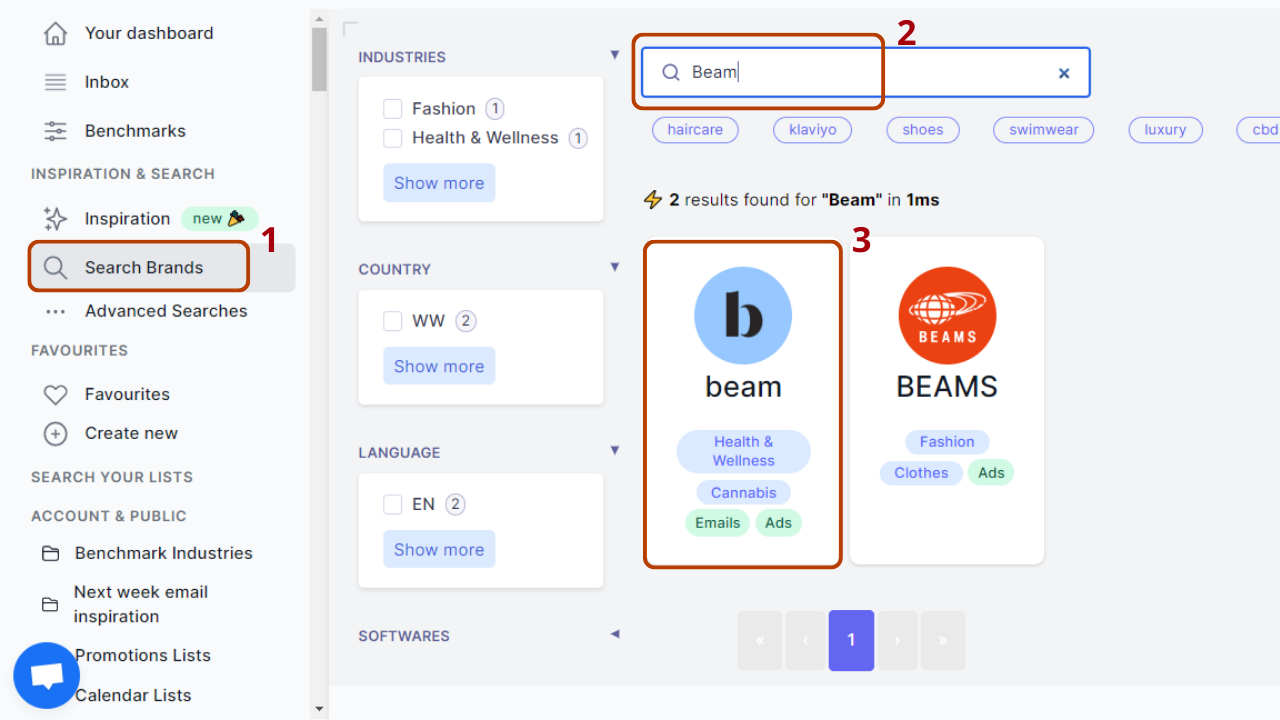
If you're looking to gather insights about your competitor's email marketing strategies, Panoramata provides a comprehensive solution. You search for your competitor's name using the "Search Brands" feature on the Panoramata dashboard, you enter the competitor's name in the search bar and click on your competitor profile in the search results.
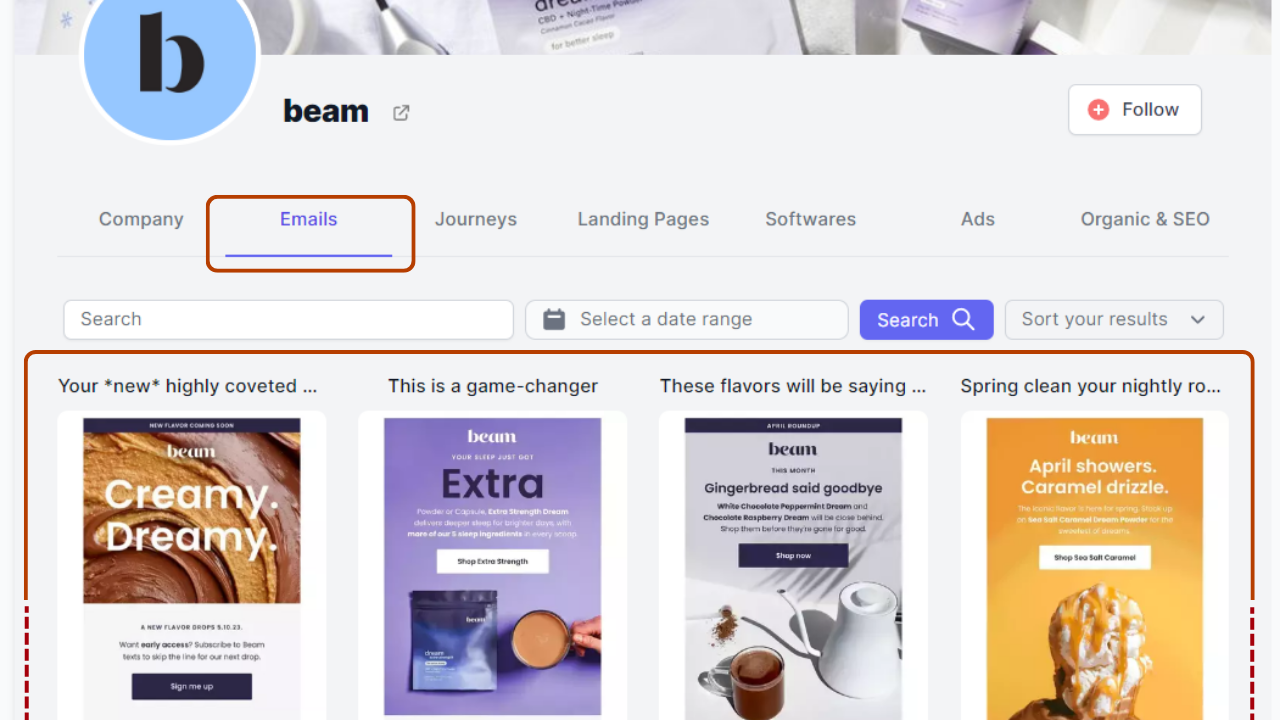
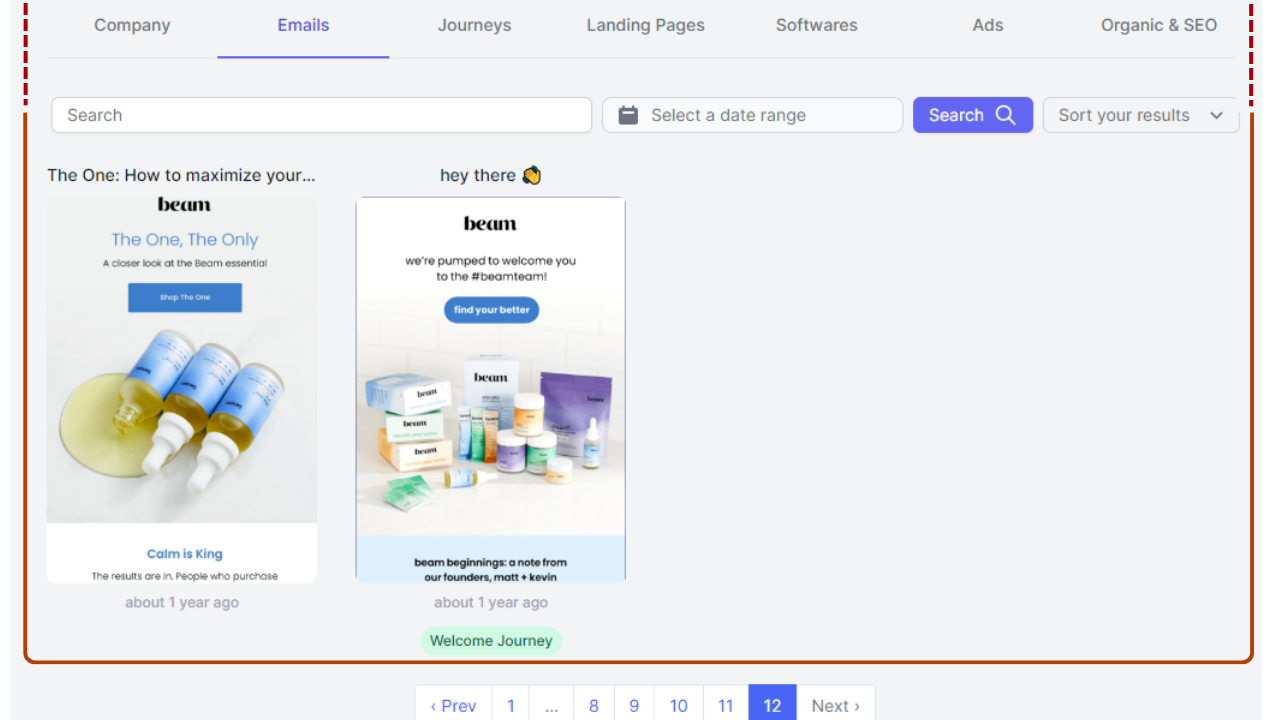
When you open your competitor's page on Panoramata, navigate to the "Emails" tab to explore their emails ranging from the most recent to the oldest. Additionally, you can leverage the various filters available to refine your search based on your specific competitive analysis goals.
Optimize Competitor Email Results: Refine and Enhance Your Search on Panoramata
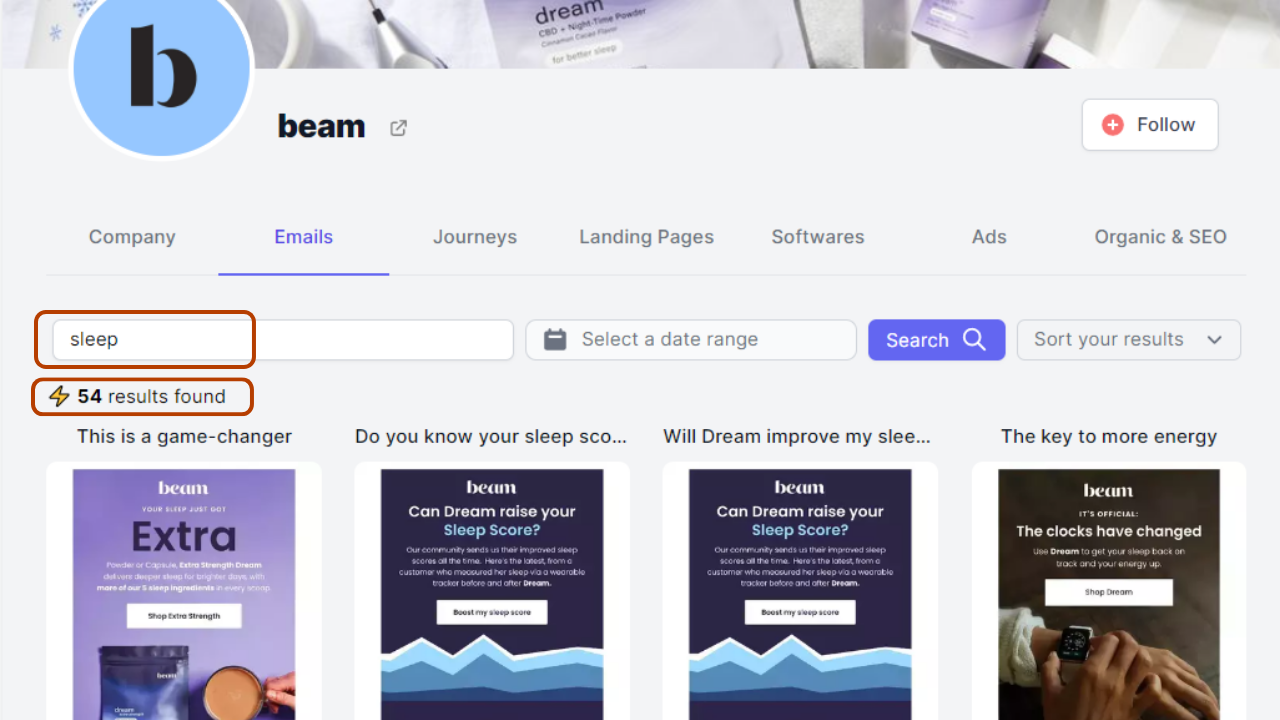
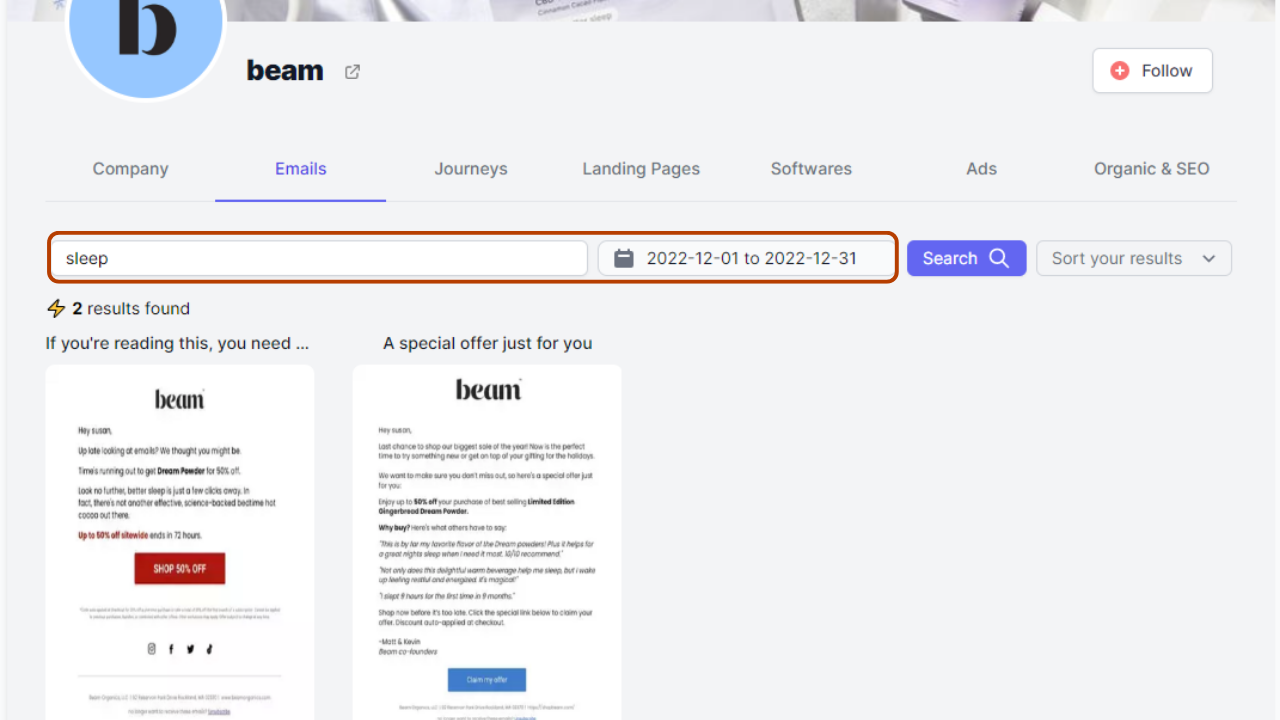
Utilize the search bar to find emails specifically related to a particular keyword. We stick with the same brand “Beam” and by searching for examples for the term "Sleep", the results are narrowed down to 54 emails that include the keyword in their subject lines or content.
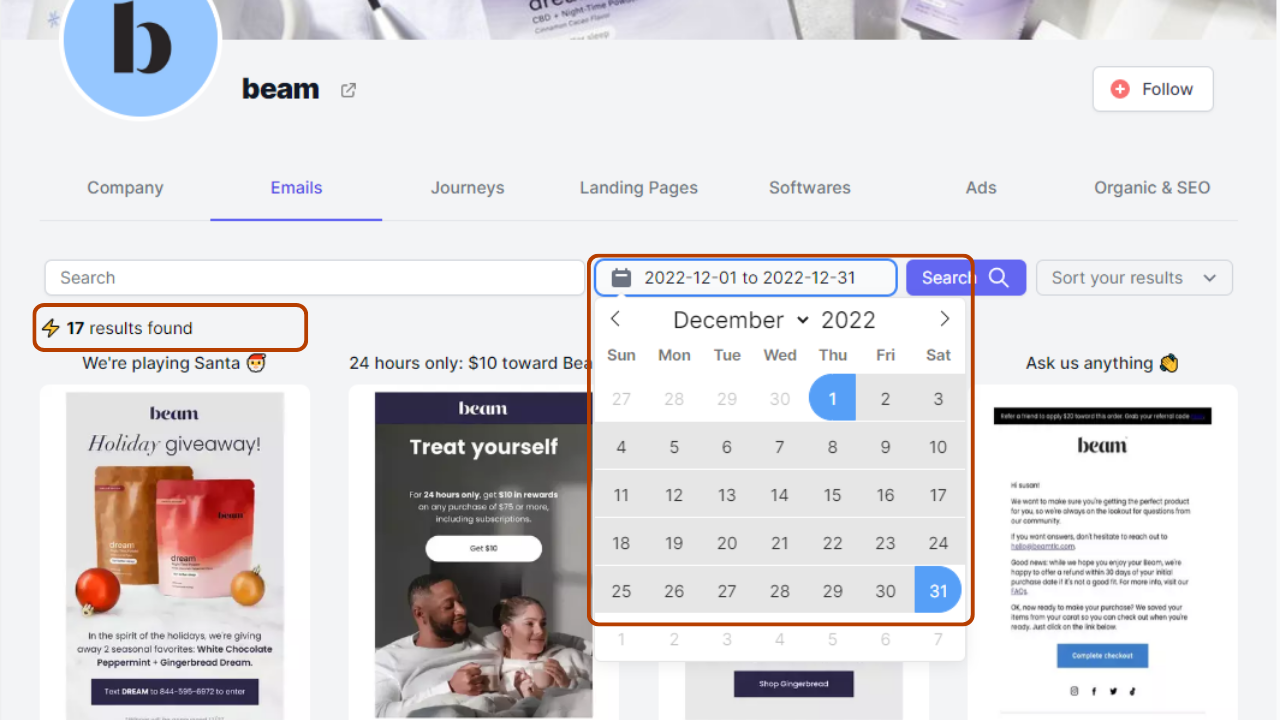
Easily view emails within a specific date range to analyze the communication strategies of your competitors. For instance, if you're interested in understanding how a competitor approached their email marketing during the crucial Christmas season, you can select the date range from December 1 to 31 December, 2022. Within this period, you will find 17 emails that provide insights into their Christmas marketing tactics
Please note that Panoramata offers this date range filter not only for individual competitor searches but also for created Benchmarks on the platform.
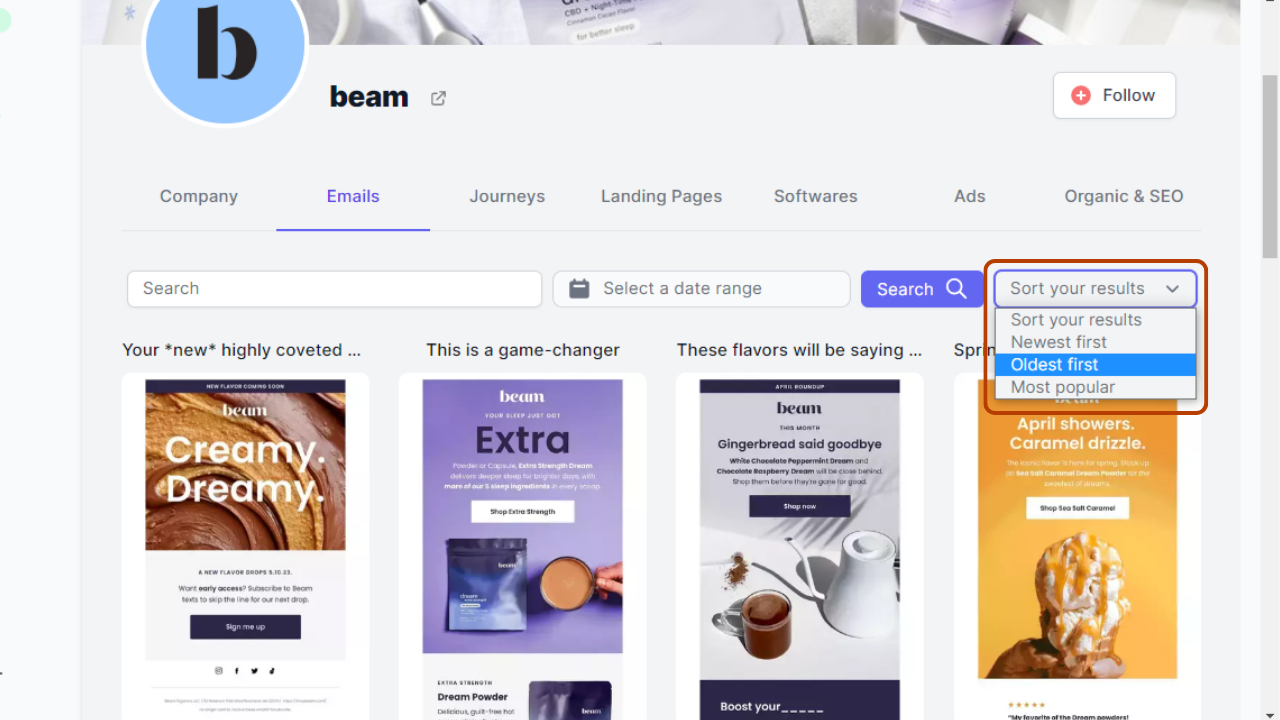
By default, the emails are arranged in descending order, showcasing the newest ones first. However, you have the flexibility to invert the display order. This sorting feature proves valuable when you wish to focus on analyzing a competitor's initial series of emails sent to visitors, such as welcome emails. Additionally, it enables you to easily compare and study the optimization techniques and modifications implemented in the more recent emails in comparison to the older ones. This capability aids in understanding the evolution and improvements in their email communication over time.
By default, the emails are arranged in descending order, showcasing the newest ones first. However, you have the flexibility to invert the display order. This sorting feature proves valuable when you wish to focus on analyzing a competitor's initial series of emails sent to visitors, such as welcome emails. Additionally, it enables you to easily compare and study the optimization techniques and modifications implemented in the more recent emails in comparison to the older ones. This capability aids in understanding the evolution and improvements in their email communication over time.
Competitors' Journey Emails: Gain Insights and Inspiration on Panoramata
Steal this: open a competitor's Launch Flow to see how they sequence a launch, email by email.
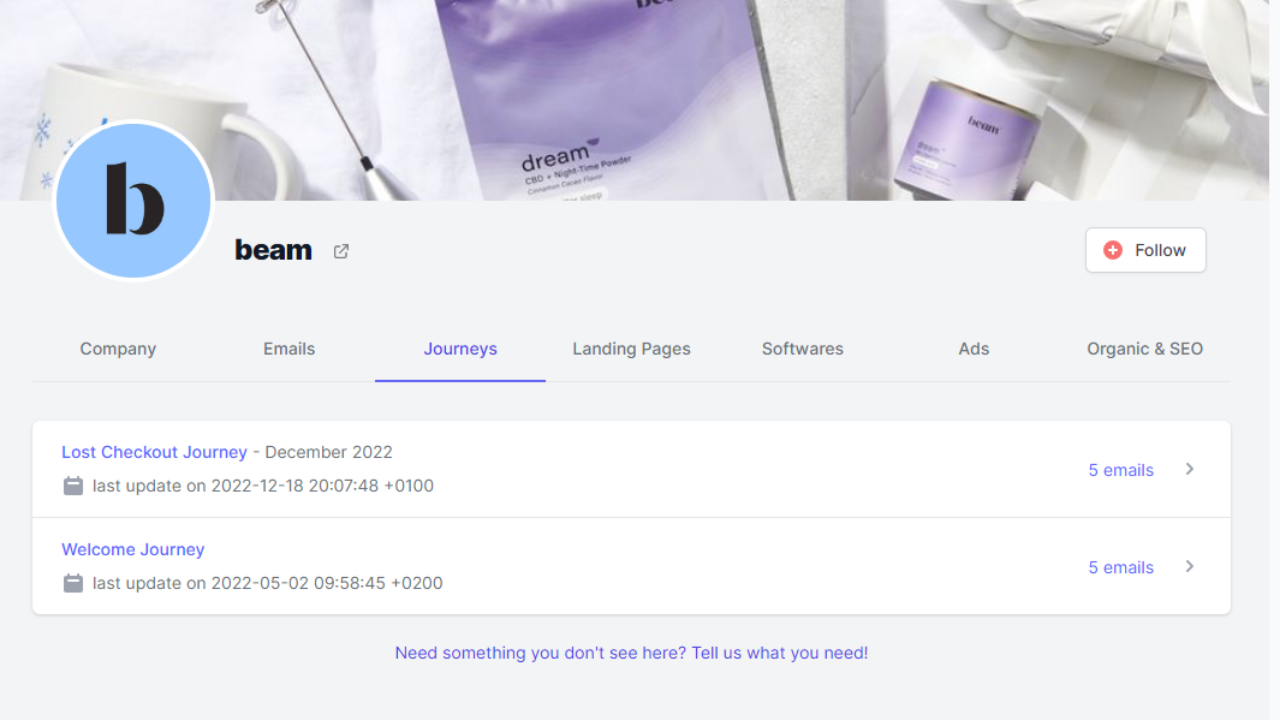
On your competitor's page in Panoramata, you gain exclusive access to their meticulously crafted email Journeys, curated by our expert team. For instance, in the case of "Beam", you can explore the Lost Checkout Journey and the Welcome Journey, each comprising 5 emails.
If you have information or any specific Journey you would like us to investigate on behalf of your competitors, kindly reach out to us through the link provided below the list of Journeys. We are here to assist you in uncovering the most effective strategies employed by your competitors.
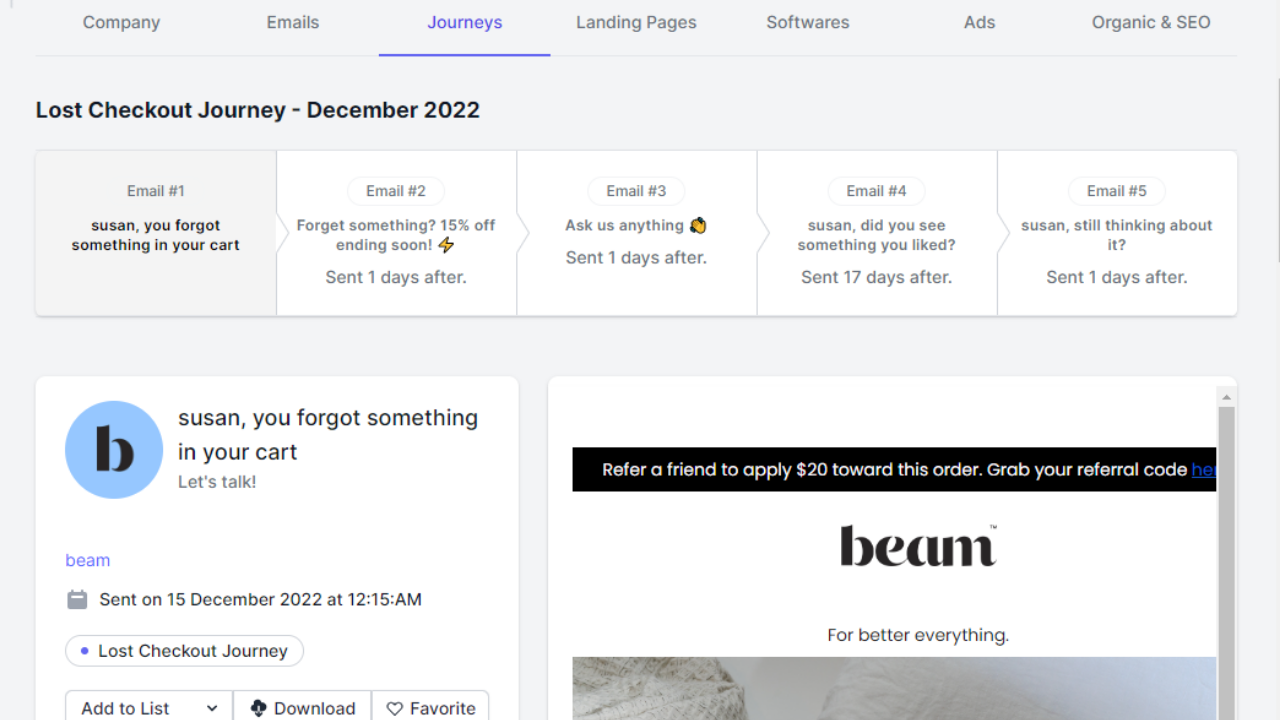
You gain complete access to the subject lines of all the emails, and with just a click, you can navigate between the content of the five emails in a single location. This streamlined process simplifies your competitor analysis efforts.
Organize and Save Your Competitors' Top Emails in Dedicated Files
Steal this: build a "Launch swipe" list so every great launch email is one click away next time you ship.

When you open an email on Panoramata, you have the option to save it by simply clicking on "Add to List". Additionally, you can click on "Download" to capture a high-resolution screenshot of the email. Lastly, you can mark an email as a "Favorite" by selecting the "Favorite" icon. These convenient features enhance your email management experience on Panoramata.
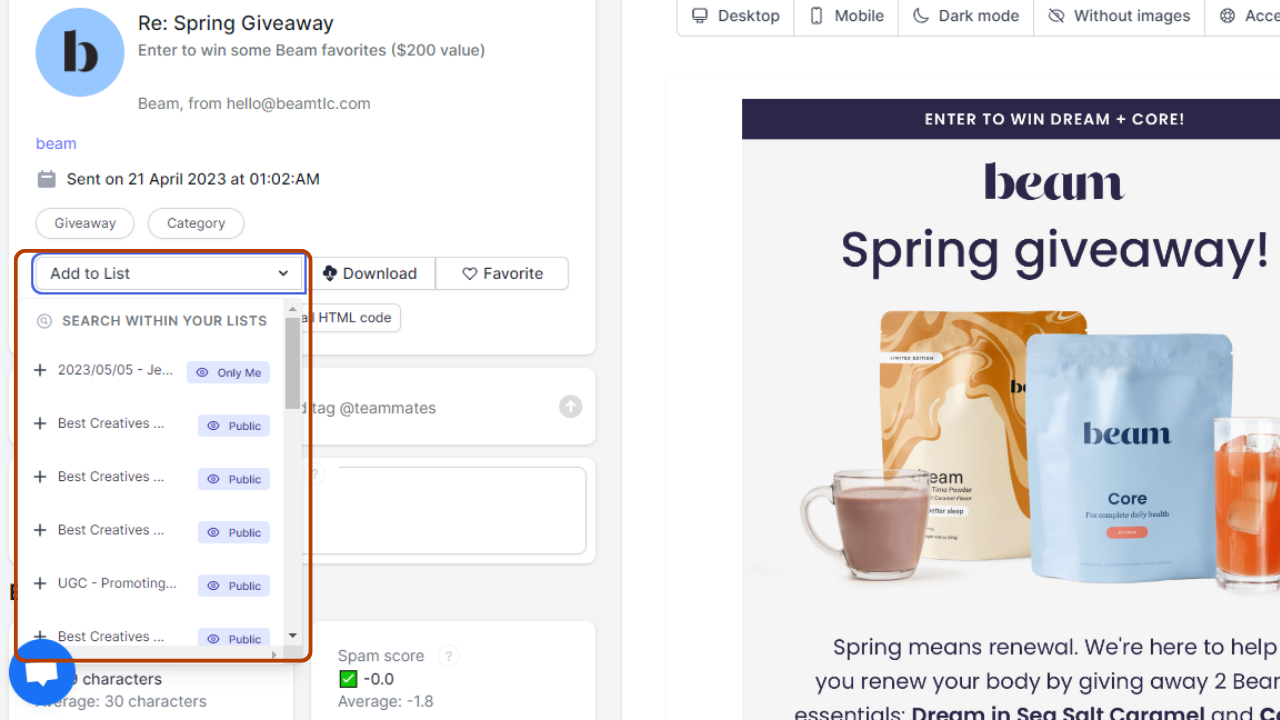
Once you open an email and click on "Add to List", you have the flexibility to choose the desired file where you want to store the email. This feature allows you to easily organize and categorize your emails according to your preferences.
FAQ
What is a product launch email?
It's an email announcing a new product, feature or collection. It builds anticipation, reveals the product, and gives a reason to act — usually across a short sequence, not one send.
How many emails should a product launch have?
Three at minimum: teaser, announcement, last chance. For a bigger launch, add a deep-dive and a social-proof email for five total.
What should a product launch email subject line say?
Tease or reveal, not both. Before launch, spark curiosity ("something's coming Thursday"). On launch day, be clear ("It's here: [product]"). Match the subject to the stage.
When should I send a product launch email?
Start teasing 3–7 days out. Send the announcement the morning of launch. Follow up 1–3 days later while attention is warm.
Where can I find product launch email examples?
Inside Panoramata you can search hundreds of thousands of real brand emails by keyword, industry and journey — including launch and welcome sequences — and save the best as a swipe file. The walkthrough above shows how.


