

We’ve all been here: time to launch new ads or schedule the next month of newsletters and…
Marketer’s block.
It might be hard to trigger or find new ideas sometimes.
But your competitor’s marketing strategy is a great source of inspiration.
Of course, you shouldn’t copy.
There are high-performing creative concepts in your competitors’ work: inspiration you can use to find your next winning campaigns.
Let’s see how to do this together - so you can turn their hard work into your team’s inspiration
We’ll review how to find the data, filter to find the right examples, and organize our inspiration files to make the most out of them and create new campaigns.
Again, Panoramata helps you achieve this entire process automatically.
How to find competitor marketing data
For this, the best way is to use Panoramata—by far. It’s the most extensive database, at the cheapest cost, for the best value.
We built to track this at a fraction of the cost of enterprise tools.
Check our pricing page for a comparison.
Nothing beats it.
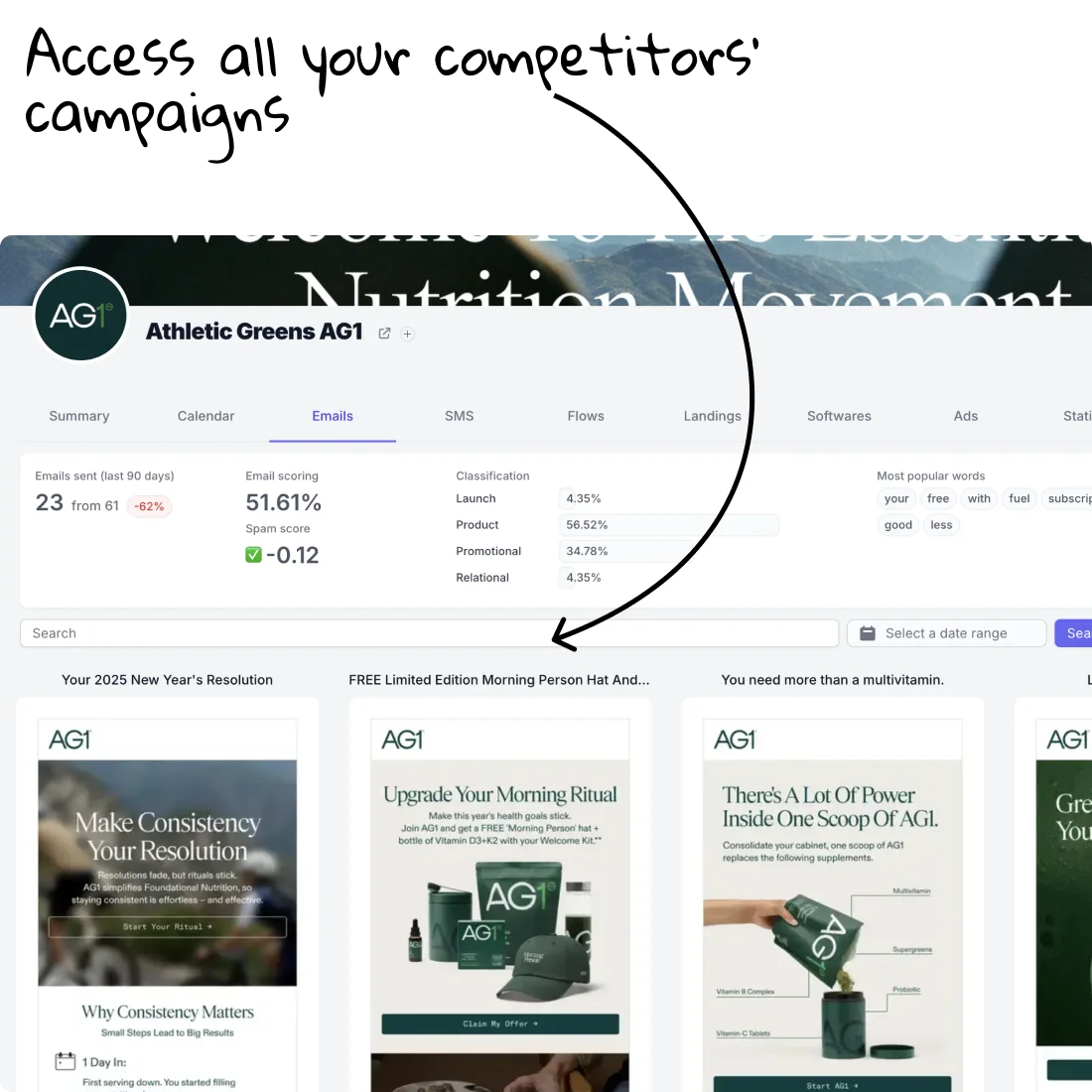
You’ll get access to all your competitors’ campaigns in one place.
Their emails, ads, landing pages, SMS, reviews, content calendar, and more.
You can filter them, search specific keywords, and access any campaign instantly in a board or a list—your own swipe file you can interact with.
This platform is basically created for this specifically—so you can turn your competitors’ creatives into your source of inspiration and your next winning campaigns.
We’ll cover two main examples in this article, but this works too for funnels, landing pages, and SMS.
Collect your competitors’ emails and newsletters
You can do this two ways.
If you want to access a specific competitor only, then on its company page, you can click on the Emails tab, and you’ll get access to all their email newsletters in a single place. You can, of course, search, filter, and look at a specific date range, etc.
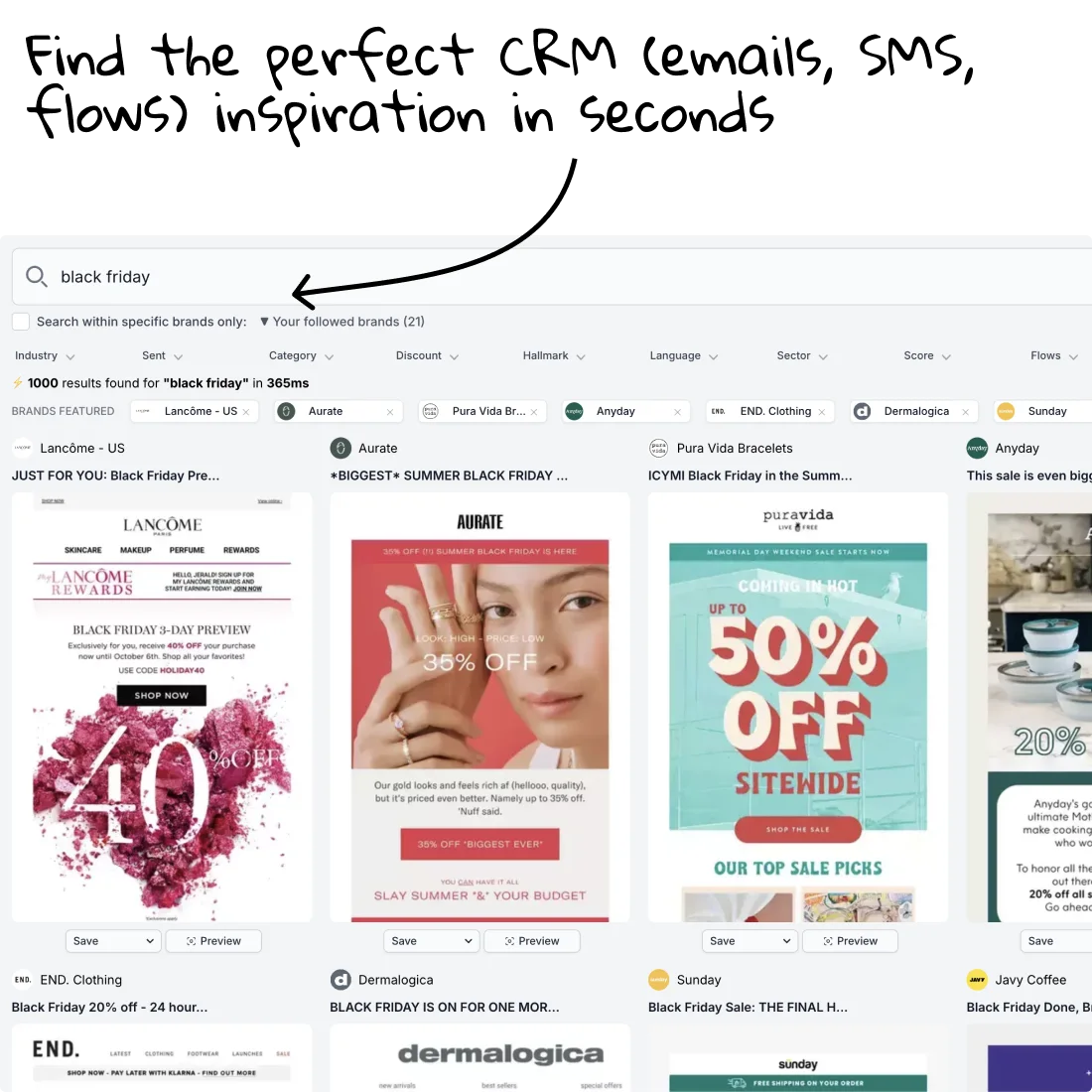
If you want to see multiple companies at the same time or from a whole industry, then the Email Search is the best way to get started. This way, you’ll get access to all the emails sent by a group of companies or an industry.
And the best thing is… well, it’s a search!
So you can search any keyword and/or use filters to really find the examples you’d like!
And here you go—you can find tens of thousands of emails about any specific topic, from your competitors directly or leading brands from your industry.
Spy effectively on your competitors’ ads
The same thing happens for the ads, indeed!
You have the two main ways again, based on what your real goal is. You can also try both techniques.
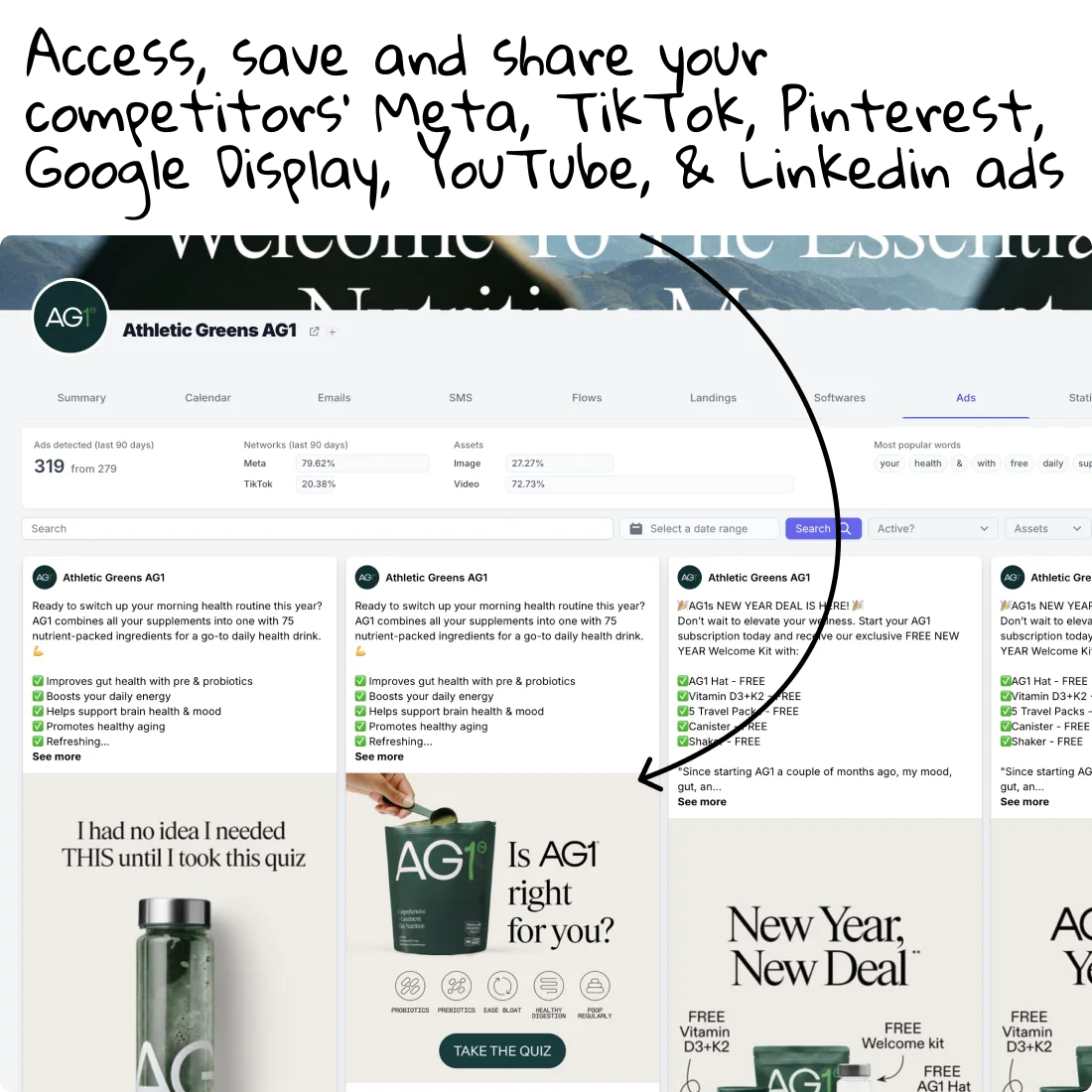
- You can target a specific competitor and look for all their ads (Meta, TikTok, Pinterest, Display, YouTube, LinkedIn, etc.) in a single place. By clicking Ads on their company profile, you’ll see all their ads right away, with the ability to filter/sort/search through them and download/save them, of course.
- If you’re looking for examples more broadly—from several companies at the same time or a whole industry—then the Ads Search is the best place to get started, as you’ll be able to search with our exclusive filters and the keyword search to find any kind of examples you’d like.
Two different techniques, same result: perfect inspiration and hundreds of relevant examples.
This applies to emails, ads, or any other marketing assets.
Inspiration, check ✅
Filter the right examples, do not take everything
Be a filter, not a sponge
That’s advice I look at every new year. It’s a self-development bit I love to remember.
Do not be a sponge—you can’t expect to handle every single data point/campaign and expect to have a perfect output.
Your real role here is to be a filter, not a sponge.
So you should filter all the examples you’re looking at in order to save the relevant ones for you, which will give you the power you need to create winning campaigns.
For this, 2 sets of rules exist.
If you implement this, you can be confident your next campaign is on the right track.
Best Starting Point: Use data-oriented filtering to prioritize ROI
4 Data-Driven rules for performance
These rules apply when you’re looking for performance mostly, and you want to see what’s working for your competitors: at least what the data’s telling us.
Look for:
- Longevity of the ad
- Format repetition (a lot of UGCs, or statics, or founder, or comparison)
- Funnel stages (does it look like awareness? or retargeting? is it problem- or solution-aware?)
- USP repetition (is this Unique Selling Prop repeated and used a lot within their ads?)
4 Creative rules for design inspiration
This matters when you’re mostly looking for creative inspiration—design, formats, etc.
Look for:
- Style (UGC, Founder, Quiz, Comparisons, etc.)
- Angle (Price, Discount, Benefits, Features, etc.)
- Hook (Future You, FOMO, classic social media hook, etc.)
- Colors, Font & Branding
These two sets of rules can, of course, work together.
But depending on your goals, they’re a good starting point! Combine them and it will be perfect.
How to organize your inspiration
Now, we’ve collected examples already—whether these are emails, ads, or landing pages, it works the same.
You saved them all somewhere, or you used the List/Board feature on Panoramata, which is made exactly for this.
What’s next?
You should reorganize this inspiration so you can clearly see why and how each creative matters to you.
I usually like to reorganize my swipe files two ways: in a timeline or by angle. Again, on Panoramata, you can easily switch these setups.
Let’s use Christmas as an example—let’s say I’ve saved dozens of examples.
I could:
- Reorganize them in a timeline:
- End of November: BFCM Closing / Christmas Gift Guide
- Beginning of December: Christmas Gift Guide, First Sale
- Mid-December: Christmas Sale
- Last call for Christmas delivery
- Gift cards, etc.
- Reorganize them by angle:
- The Creative Analytics feature on Panoramata does this exactly for you, automatically—and will tag/label each creative based on its creative characteristics.
- Gift your loved ones
- Sales & Christmas discount
- Gift yourself & self-care
- Different hooks/angles, USPs, etc.
Instead of just getting a list with examples that don’t make much sense, you can reorganize them effectively.
Good news: this is exactly why we’ve created the Board feature.
How to create new campaigns based on your competitors’ ideas
Now, you have hundreds of examples, filtered and organized.
The fun begins.
It’s now time to turn these examples into winning campaigns for you.
Of course, you should NEVER EVER copy them blindly.
That’s a recipe for failure.
Instead, make sure you can reappropriate them for your own good.
I have more good news for you: the work is 90% done.
By filtering the examples and reorganizing them like we’ve mentioned, you just need to apply your own layer on the creative concepts you’ve saved, and you’ll be done.
To make this article as helpful as possible, I’ll show how to do this based on the two reorganizations we’ve done earlier.
Create time-based campaigns from competitors
For this, you should make sure to have a few examples per date/moment you want to create.
The process to come up with your own full campaign is the following one:
- For each date, extract the main CTAs, USPs, formats, and angles. By saying “main,” I mean the ones that you find the most interesting.
- Take a few copy examples (subject lines, headlines) as references as well.
- Create your own version of the email/ad, adding these CTAs/USPs/formats into yours. The easiest is, of course, to adapt an existing template, a previous version you already created.
Create creative-based campaigns from competitors
This is maybe the most common.
It takes a bit more work at the organization level (the previous step), because you should correctly identify the different angles/formats you need to create the right campaigns for you.
With the Creative Analytics feature on Panoramata, this is easy, of course.
Let’s say you’ve identified two hooks and two formats you’d like—the next step is to apply these angles to you. For example:
- Formats: for example, UGC or Founder Mode—in this case, work with a UGC creator to create such a video, following the script you’ve identified, and ask your founder to record himself too. Again, you can use the ads you’ve saved as references.
- Angles: for example, Discount or Comparisons—in this case, create your own discount campaigns and/or your own comparison, with your positioning, unique attributes, and your unique branding.
And there you go!
From competitors’ creatives, you’ve been able to create your own campaigns.
You’ve been able to collect the right and most useful data, reorganize it properly so it would make sense to you… and then create your own campaigns as well!
Quick note here: Panoramata is the go-to platform if it’s something that you do at least once a quarter.
It will help you achieve this with greater results and save hours in the process.
FAQs
I don't want to copy them, but not sure how can I use my competitors campaigns?
You’re right not to copy. The goal is to spot patterns that work, then adapt them to your brand. Use competitor campaigns to learn their angles, offers, timing, channels, and funnel logic, then build your own version around your positioning and audience.
How can identify their best performing assets?
Watch what gets repeated. If the same ad, offer, or landing page is launched multiple times (or kept live longer), it’s usually a strong performer. Then validate with channel presence and engagement signals. Targeting/spent is less and less reliable on a creative level, it's best to spot and track their creatives angles (because Meta, for instance, does the targeting automatically).
Can I do this automatically?
Yes. You can automate this with competitor-tracking tools that monitor emails, ads, landing pages, flows, and site changes, then benchmark brands in real time so you can focus on strategy instead of manual tracking.


